Local AI · GPU-accelerated · Speech-to-text for Windows
Crystal-clear transcription. Powered by your GPU. Not the cloud.
Voice-to-text, reinvented. Kuular runs GPU-accelerated AI right on your PC and turns what you say into clear, ready-to-use text — without the usual struggle.
✦ On-device AI. No account required. Your words stay yours.
⌁
Not sent. Just understood.Transcription happens on your device.
YOUR PRIVATE WORKSPACEWINDOWS DESKTOP
Less friction. More flow.
BUILT FOR THE WAY YOUR MIND WORKSNOT ANOTHER CLOUD TAB ↙
Local first.Your audio, on your machine.
Windows ready.A real desktop workspace.
Your model.Whisper.cpp · ONNX · SafeTensors
Your pace.Record. Review. Keep going.
FROM “I SHOULD WRITE THAT DOWN”
To “glad I said that.”
For the first draft, the next big idea, and everything you don't want to forget.
01 / CAPTUREStay in the moment
Don't break your train of thought.
Record from Studio or use your own global shortcut. Optional live previews let you follow your words as you speak.
Ctrl+KYOUR NEXT IDEA
Hold to record, or double-tap to start. Your shortcut, your choice.
02 / KEEP↗
A home for every good thought.
Search your local transcript library by text, status or date. Open the full transcript, copy it, or replay the original audio.
That idea for tomorrow...Saved on your device
The words you want to keep.Ready when you are
03 / CHOOSE◈
Local AI. Not one-size-fits-all.
Discover compatible Hugging Face models. Choose your balance of model size, language support and hardware.
Whisper.cppSherpa-ONNXTransformers
04 / MAKE IT YOURSCPU or supported GPU
Your hardware has a voice, too.
Load GGML models on CPU or Vulkan, or use optional PyTorch with NVIDIA CUDA. Named device selection puts you in control of where inference runs.
LOCAL AI
YOUR DEVICE YOUR COMPUTE
Sherpa-ONNX runs on CPU. GPU support depends on the runtime and driver.
NO MOCKUPS. THE REAL WORKSPACE.
Made to feel like your space.
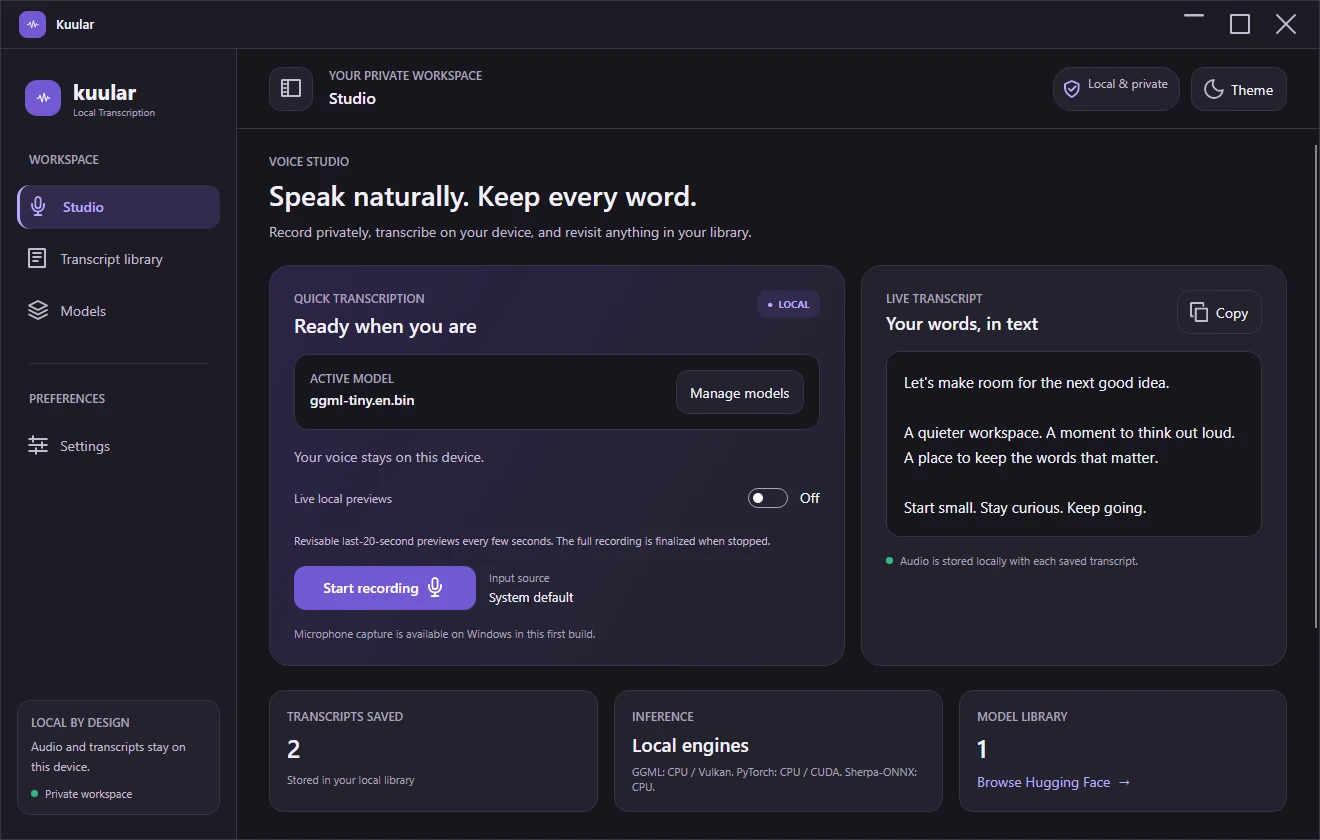
Studio — a quiet space to capture your next thought.
Actual application screenshots with demonstration data. No personal recordings shown.
RIGHT HERE. NOT OUT THERE.
SOME THINGS SHOULD STAY WITH YOU
Your voice isn't a cloud upload.
Ideas can be messy. Personal. Not quite ready for the world. Kuular transcribes locally, so the audio you record doesn't need to leave your computer.
Local inference, without an account
Audio and history stored on your device
Download a model once. Transcribe offline.
Internet is needed to download the app and models. Optional model discovery contacts Hugging Face; it does not upload your recordings.
A SMALL RITUAL. A BIG DIFFERENCE.
From voice to words, without the detour.
01
Make yourself at home.
Install Kuular on Windows and download a compatible local speech model.
02
Say what's on your mind.
Pick your microphone and press record. Or stay in your flow with a global shortcut.
03
Keep the good stuff.
Stop recording to finalize your transcript. Review, copy and revisit it in your library.
A FEW THINGS WORTH KNOWING
Curious? Good.
Thoughtful answers, before you press record.
Does my audio leave my computer?
Kuular's speech recognition runs locally. Recordings, transcripts and timestamps are saved in your local database. Downloading models and browsing Hugging Face requires internet access, but does not send your audio there.
What do I need to run it?
The initial release is for Windows x64. The self-contained installer includes the .NET runtime. Whisper.cpp also requires the Microsoft Visual C++ 2015–2022 x64 redistributable, installed separately; that Microsoft installer may require administrator approval. You'll need a microphone, disk space for the app and a compatible model, and enough memory for that model. A GPU is optional. Model memory requirements vary; weight sizes are not total runtime memory requirements.
Do I need a GPU or a Python installation?
No. GGML and Sherpa-ONNX support CPU transcription without Python. GGML can use a compatible Vulkan GPU. Transformers is an optional advanced runtime requiring a separate Python environment; NVIDIA CUDA needs compatible hardware and drivers. That environment and speech models are not bundled with the installer.
Is the live preview the final transcript?
No. Live previews are revisable text from a rolling recent-audio window. After you stop, Kuular transcribes the full recording and saves the final result. It isn't a word-by-word streaming decoder.
Can I trust every word automatically?
Speech recognition can make mistakes. Accuracy depends on your model, language, microphone and environment. Review important transcripts, especially names, numbers and sensitive information. Your saved original audio lets you check what was said.
What should I know about this Windows release?
This is an early Windows build. The installer is not code-signed, so Windows SmartScreen may display an unknown-publisher warning. Check the published SHA-256 checksum and only install a download you trust. macOS, speaker diarization and system-audio capture are not included.
GIVE YOUR NEXT IDEA A VOICE
Good thoughts deserve to be heard.
Your private transcription workspace. Ready for the way you think.
 kuular